
Priority To
The Priority To algorithm is used to convert the DateTime value to the number of minutes elapsed since 1 Jan 1988. This format is sometimes used in some ERP systems.
The table below provides some examples of this date format conversion.
| Source Column | Target Column |
|---|---|
| 10/08/2019 17:03 | 16709163 |
| 09/07/2018 17:03 | 16664523 |
To configure this manipulate step, follow the instructions below:
- In the Admin Navigation tree, select Interfaces > InterfaceName > Tasks > TaskName > Steps.
- On the toolbar, click New >New Manipulate Step.
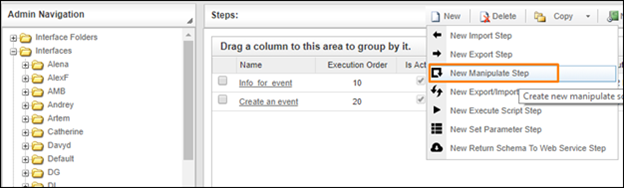
Creating a New Manipulate Step
- Navigate to the Dates section and select Priority To.
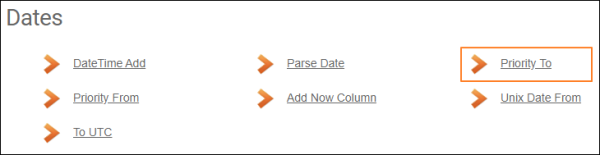
Dates Section
- In the Convert To Priority Date Format work area, fill in the following fields:
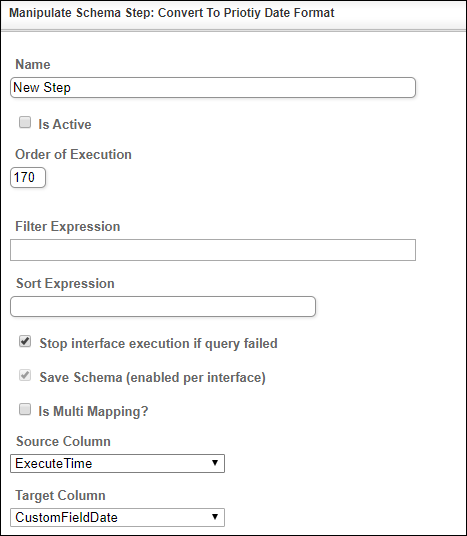
| Fields | Description |
|---|---|
|
Name |
Provide a distinctive name for this step. |
|
Is Active |
Select the check box to engage the scheduler for this step. |
|
Order of Execution |
Enter the order in which this step should be executed. |
|
Filter Expression |
Optional. Use this filed to filter data from the source database prior to inserting it into the Schema table. |
|
Sort Expression |
Optional. Use this field to sort data from the source database prior to inserting it into the Schema table. |
|
Stop interface execution if query failed |
Optional. If enabled, the system will stop any data manipulation if the query returns an error. |
|
Save Schema (enabled per interface) |
If selected, the schema is created for this step. |
|
Source Column |
Select the column where you will retrieve the data source. |
|
Target Column |
Select the column where you will get the converted value. |
- Click the Save button.